Percent Decrease Calculator Guide: Discounts, Price Drops, and Reverse Percentage Checks
Searchers looking for a percent decrease calculator usually are trying to verify a discount, measure a price drop, compare a budget cut, or explain why a number fell. The current intent is practical rather than academic: people want the right formula, the right base number, and a quick answer to whether the drop is as large as it looks. They also often need reverse percentage math right after the first calculation.
Check the drop while you read.
Open the Percentage CalculatorQuick answer: what a percent decrease calculator should do
A useful percent decrease calculator should show the amount of the drop, the percentage decrease, and the original value used as the baseline.
That baseline matters because using the new value instead of the old value produces a different number and is the most common error in discount and price-drop math.
What people are obviously searching for
The main search-intent cluster is direct and high frequency:
- percent decrease calculator
- percentage decrease calculator
- calculate percent decrease
- discount percentage calculator
- price drop calculator
- markdown calculator
- sale percentage off calculator
- percent off calculator
- decrease percentage formula
- reverse discount calculator
What people are really asking before they trust the result
The practical questions are more specific:
- What is the percent decrease from 120 to 90?
- How do I calculate a sale discount from the original price?
- How do I find the original price after 25% off?
- Is percent off the same as percent decrease?
- Why do two 10% discounts not equal one 20% discount?
- How do I calculate a budget cut or revenue decline correctly?
- Should I calculate discount before or after sales tax?
- How do I calculate percent decrease in Excel?
- What is the difference between dollar decrease and percent decrease?
- How do I reverse a final sale price back to the list price?
The core formula
The standard percent decrease formula is:
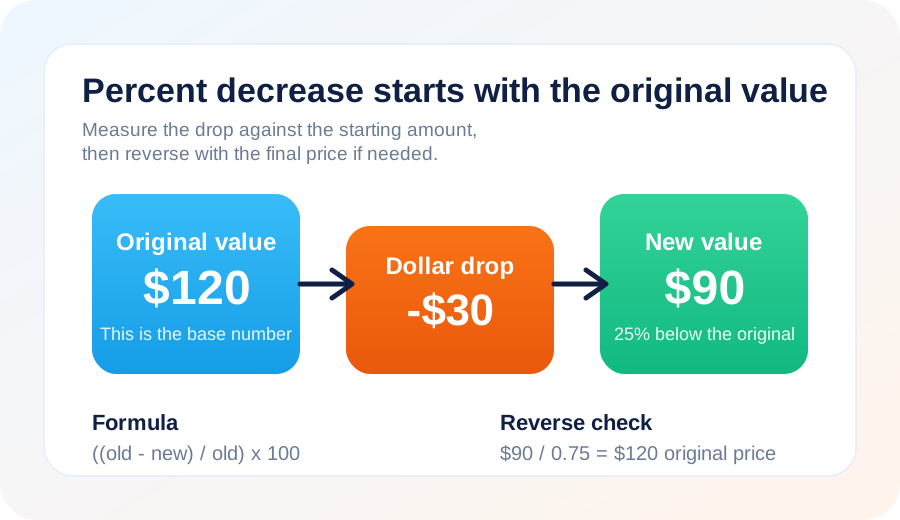
((old value - new value) / old value) x 100
That formula uses the old value as the denominator because the decrease is measured against where the number started.
Example: a price drop from $120 to $90
- Dollar drop: $120 - $90 = $30
- Divide by old value: $30 / $120 = 0.25
- Convert to percent: 0.25 x 100 = 25%
That means the item fell by 25%, not by 30% and not by 33.3%. The mistake usually happens when someone divides by the final price instead of the starting price.
Why this calculation stays useful
Discount and checkout math happen constantly
Shopping queries are persistent because people compare sale banners, coupons, final checkout totals, and stackable promotions. Percent decrease is often the first step, but not the last one.
Businesses and households both track declines
Budget cuts, revenue dips, lower utility bills, and reduced monthly expenses all use the same formula. The context changes, but the calculation stays stable.
Reverse discount questions are common
People often know the final price and the percent off, but not the original value. That creates follow-up intent around reverse percentage math, especially in ecommerce and retail.
How to use a percent decrease calculator correctly
1. Start with the original number
The original value is your base. If you divide by the final value, the answer becomes a different ratio and can exaggerate the drop.
2. Separate the dollar drop from the percentage drop
A $30 drop means something very different on a $60 item than on a $300 item. The percent decrease adds that context.
3. Use reverse math when you only know the final price
If an item costs $90 after 25% off, the original price is not $115. You divide by 0.75, which gives $120.
4. Keep tax and fees outside the basic discount formula
Discount is usually calculated before sales tax. If you need the checkout total, move next to the Sales Tax Calculator Guide once the percent decrease is done.
Reverse percentage math: how to find the original value
When you know the final amount after a reduction, use:
original value = final value / (1 - rate as a decimal)
For 25% off, divide by 0.75. For 40% off, divide by 0.60. This is the cleanest way to reverse markdowns and sale prices.
Why two 10% discounts do not equal one 20% discount
If a $100 item gets 10% off, it becomes $90. A second 10% discount applies to $90, not to the original $100. That means the second drop is $9, and the final price is $81.
The total decrease from $100 to $81 is 19%, not 20%. This is another case where the changing base value matters more than the percent label.
Common percent decrease scenarios
Retail discounts
Markdowns, coupons, clearance pricing, and stacked promotions are the most obvious use case. If you also need before-and-after tax math, connect the result with the Sales Tax Calculator Guide.
Budgeting and bill reduction
Households use percent decrease to compare lower bills, spending cuts, or cheaper subscription plans. When the change is tied to income instead, Calcsy's Salary Calculator can help frame what the new cash flow means.
Performance reporting
Traffic, conversions, and revenue declines are often communicated in percentages. If the question is really about growth over multiple periods, the Percent Increase Calculator Guide and Compound Percentage Growth Guide are better follow-ups.
Common mistakes to avoid
Dividing by the new value
This is the most common spreadsheet and mental-math error.
Assuming discount and final checkout total are the same calculation
The percent decrease usually comes first. Tax, fees, shipping, or gratuity may change the final amount after that.
Ignoring stacked-discount math
Two successive discounts are multiplicative, not additive.
Using dollar change without context
A dollar drop tells you the absolute change, but not how significant that change is relative to the starting amount.
Related calculators and guides
- Percentage Calculator for percent-of, percent-change, and discount scenarios.
- Percentage Discount Guide for broader discount, sale-price, and shopping math.
- Sales Tax Calculator Guide for after-discount checkout totals.
- Percent Increase Calculator Guide for the companion formula and reverse-markup use cases.
- Salary Calculator if you need to translate income cuts or reduced hours into monthly and annual numbers.
FAQ
What is the formula for percent decrease?
Subtract the new value from the old value, divide by the old value, and multiply by 100.
Is a discount the same as percent decrease?
Usually yes for a simple markdown, but shopping questions often need an extra step for tax, shipping, or reverse-price checks.
How do I find the original price before a discount?
Divide the final price by one minus the discount rate as a decimal. For example, divide by 0.75 for 25% off.
Why do two 10% discounts not equal one 20% discount?
Because the second discount applies to the reduced price, not the original starting price.
Can I use the same calculator for price drops and budget cuts?
Yes. The percent decrease formula works for any value that fell from an original amount to a lower new amount.